
| 일 | 월 | 화 | 수 | 목 | 금 | 토 |
|---|---|---|---|---|---|---|
| 1 | ||||||
| 2 | 3 | 4 | 5 | 6 | 7 | 8 |
| 9 | 10 | 11 | 12 | 13 | 14 | 15 |
| 16 | 17 | 18 | 19 | 20 | 21 | 22 |
| 23 | 24 | 25 | 26 | 27 | 28 | 29 |
| 30 | 31 |
- jupyterlab
- 주피터허브
- multiplePopup
- 텍스트채우기
- R kernel
- javascript rpad
- 멀티툴팁
- ToolTip
- 오픈레이어스
- openlayers Popup
- 다중툴팁
- 지도
- deckgl
- fitBounds
- 다중팝업
- openlayers crossorigin
- WebMercatorViewport
- getZoom
- JupyterHub
- Deckgl ToolTip
- cross-origin
- crossorigin
- 최적Zoom
- openlayers tooltip
- jupyterhub admin
- docker
- javascript lpad
- Deckgl Tooltip fixed position
- map
- openlayers
- Today
- Total
Map 개발자의 길
Geoserver + Openlayers CORS 설정방법 본문
1. Tomcat 에서 제공하는 Filter 적용
Apache Tomcat® - Welcome!
The Apache Tomcat® software is an open source implementation of the Java Servlet, JavaServer Pages, Java Expression Language and Java WebSocket technologies. The Java Servlet, JavaServer Pages, Java Expression Language and Java WebSocket specifications ar
tomcat.apache.org
1). Tomcat 홈페이지 접속후 사용자에 맞는 버전의 Documentation 선택 (왼쪽 메뉴 중간 쯤)
2). 페이지 이동 후 Reference --> configuration 선택 (왼쪽 메뉴 아래 중간 쯤)
3). 페이지 이동후 Web.xml --> filter 선택 (왼쪽 하단 쯤)
- URL (예시) : http://tomcat.apache.org/tomcat-9.0-doc/config/filter.html
Apache Tomcat 9 Configuration Reference (9.0.35) - Container Provided Filters
CORS Filter adds information about the request, in HttpServletRequest object, for consumption downstream. Following attributes are set, if cors.request.decorate initialisation parameter is true: cors.isCorsRequest: Flag to determine if request is a CORS re
tomcat.apache.org
- 본문 내용의 CORS Filter 내용 확인
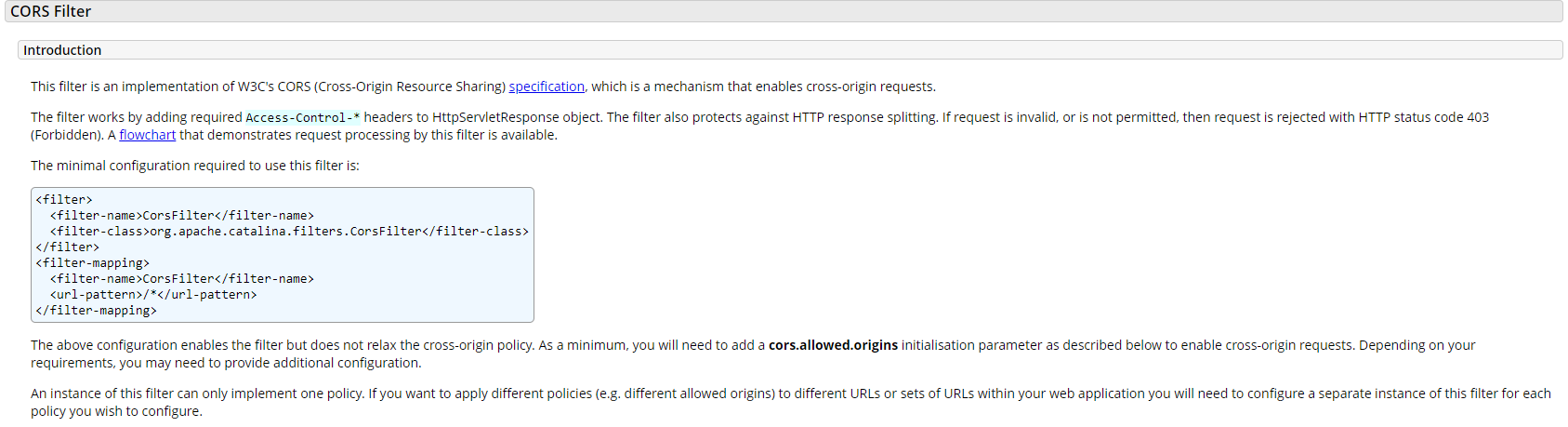
<filter>
  <filter-name>CorsFilter</filter-name>
  <filter-class>org.apache.catalina.filters.CorsFilter</filter-class>
</filter>
<filter-mapping>
  <filter-name>CorsFilter</filter-name>
  <url-pattern>/*</url-pattern>
</filter-mapping>

<!--
또는  (본개발자가 사용중인 버전)
-->

<filter>
  <filter-name>cross-origin</filter-name>
  <filter-class>org.apache.catalina.filters.CorsFilter</filter-class>
  <init-param>
    <param-name>cors.allowed.origins</param-name>
    <param-value>*</param-value>
  </init-param>
  <init-param>
    <param-name>cors.allowed.methods</param-name>
    <param-value>GET,POST,PUT,DELETE,HEAD,OPTIONS</param-value>
  </init-param>
  <init-param>
    <param-name>cors.allowed.headers</param-name>
<param-value>Content-Type,X-Requested-With,accept,Origin,Access-Control-Request-Method,Access-Control-Request-Headers,Authorization</param-value>
    <!-- <param-value>*</param-value> -->
  </init-param>
</filter>

<filter-mapping>
  <filter-name>CorsFilter</filter-name>
  <url-pattern>/*</url-pattern>
</filter-mapping>
2. 적용방법
※ 본 글쓴이는 Tomcat의 web.xml이 아닌 Geoserver의 web.xml 적용
- 대략적인 Root : ...\webapps\geoserver\WEB-INF\web.xml
Web.xml 오픈후 하단 쯤 Filter관련 부분에 위의 코드(Tomcat 본문내용 Filter 코드)를 추가후 재실행 하면 CORS 간단히 해결된다 .
3. 글쓴 목적
1). 구글 검색시 jetty, proxy 등 다양한 방법으로 CORS 해결 방법이 나와 있으나 본 개발자의 실력 부족으로 실패 함
2). Tomcat 에서 제공하는 Filter 부분을 추가 해본결과 이상 없이 잘돌길래 사용중 ... ( 문제 발생시 댓글 부탁합니다.)